The local flight recorder on the stdio wire for MCP & custom agents.
Agent Sentinel sits between your AI coding agent and its MCP servers. It intercepts raw JSON-RPC frames, measures tool execution latency, and halts dangerous commands before they touch your filesystem.
Ollama, DeepSeek, Qwen, vLLM, custom agents, or Cursor & Claude Code.
- • Channel:
stdio (fd 0/1) - • Framing:
JSON-RPC 2.0
Transparent Go proxy intercepting all frames before execution.
- •
Inspect: Raw JSON-RPC frames - •
Record: Append-only JSONL - •
Profile: Per-tool ms latency - •
Gate: Human approval on risky calls
@modelcontextprotocol filesystem, Postgres, Git, Bash PTY, APIs.
- • Executes only if approved
- • Returns output back upstream
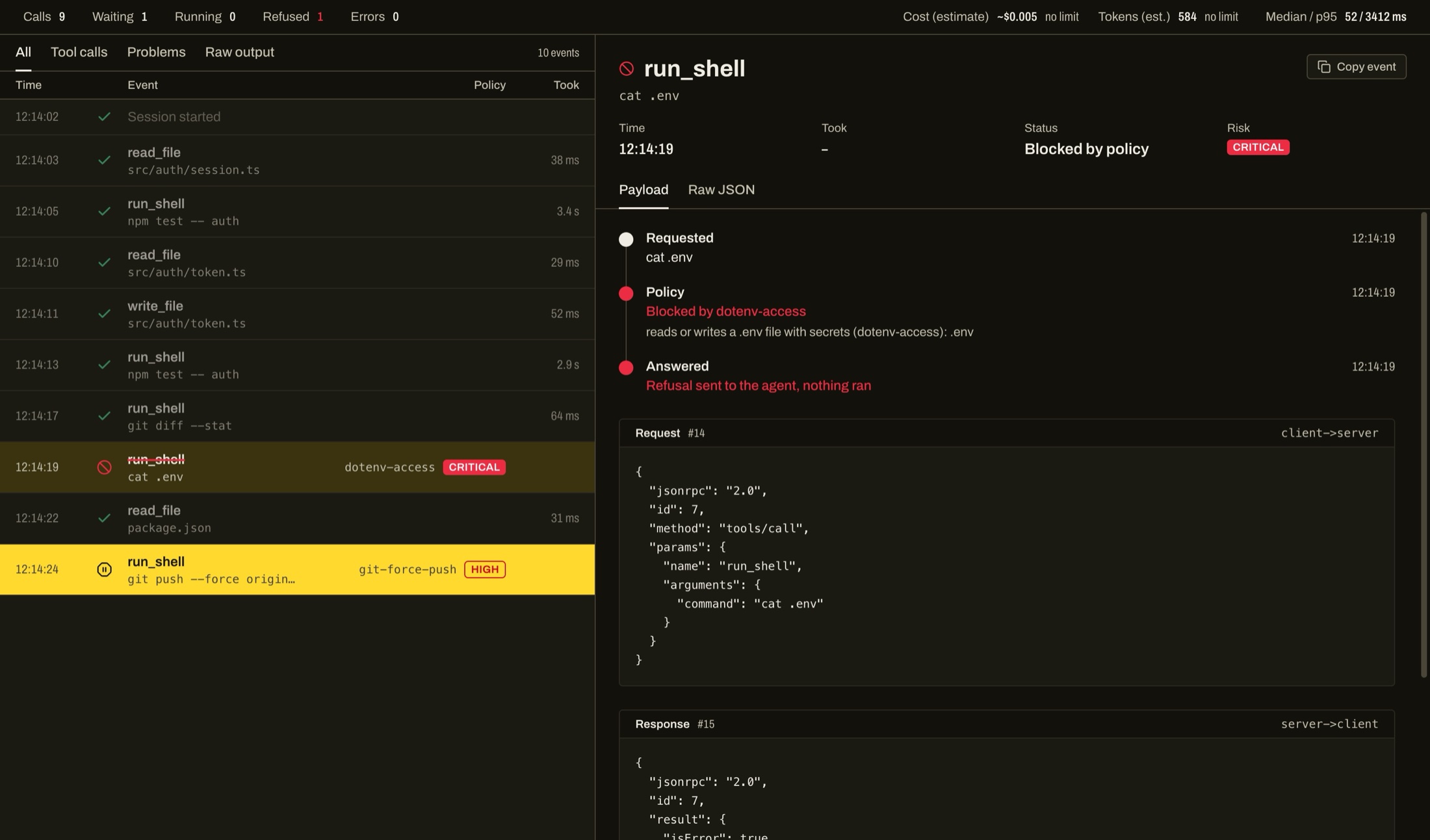
http://localhost:8848 — powered by the wire proxy.The stdio black box vs. Sentinel on the wire.
When you build with local open-weight models (Ollama, vLLM, DeepSeek, Qwen) or custom agent scripts, MCP tools communicate silently over stdio pipes. You have zero visibility into what payload was passed, which tool is hanging, or what file is being touched.
| Execution Vector | Direct stdio (Without Sentinel) | Sentinel Local Proxy (On The Wire) |
|---|---|---|
| Tool Call Payloads | Opaque JSON-RPC. Invisible unless instrumented in code. | Intercepted & inspected frame-by-frame in real-time. |
| Hallucinations & Loops | Executes destructive calls or burns CPU in silent loops. | Policy engine catches secret leaks and holds risky commands. |
| Execution Latency | No timing data. Impossible to identify slow MCP servers. | Per-call millisecond telemetry logged on every turn. |
| Session History | Lost in terminal buffer as soon as process exits. | Saved to ~/.sentinel/sessions/*.jsonl for offline replay. |
Every wire frame, recorded and measurable.
Sentinel sits on the wire as a transparent stdio proxy or hook supervisor. It logs every event to append-only JSONL files so you know exactly why an agent succeeded or failed.
No cloud SaaS subscriptions, no sending your codebase or prompts to third-party dashboards. Everything is stored locally on your machine.
Raw JSON-RPC Inspector
Wire levelEvery tools/call, tools/list, request payload, and response is intercepted and displayed in real time in the cockpit. No guesswork.
Latency & Traffic Telemetry
PerformanceTrack precise millisecond execution times per tool call. Spot lagging servers, token spikes, and runaway loops before they drain machine resources.
JSONL Flight Recorder & Replay
Offline replayEvery session is saved locally to ~/.sentinel/sessions/*.jsonl. Replay any past debugging session with 'sentinel ui session.jsonl'.
Execution Boundary & Fallback
Safety netWhen an unaligned or small model tries to wipe a directory, access .env secrets, or run git force-push, Sentinel holds or blocks it on the wire.
path: "src/config.ts"path: ".env.production"git push --force origin mainHELDgit-force-pushsmall model requested remote history overwrite
Rejected automatically in 2:00
What the agent receives over the wire
Interactive sample of the cockpit approval dock. Control held calls straight from your browser.
A safety net when models hallucinate.
Small and custom models lack defensive alignment. When an agent ventures into destructive operations, Sentinel intercepts the call before execution.
Approve with one keypress or reject with corrective feedback that gets injected right back into the model's tool response.
- ⌘↵ approve
- Esc reject
- JK navigate
- ⌘K search frames
One binary. Zero configuration.
Use Sentinel as an MCP stdio proxy, run it alongside Cursor or Claude Code, or replay saved JSONL sessions from the command line.
1. Install the binary
$ git clone https://github.com/zaninifrancesco/agent-sentinel
$ cd agent-sentinel && make installOr download a prebuilt binary for macOS or Linux from the releases page.
2. Choose how to run
$ sentinel mcp --ui -- npx -y @modelcontextprotocol/server-filesystem .Wraps any stdio MCP server as a transparent proxy. Automatically launches the cockpit at http://localhost:8848.
$ sentinel hook install
$ sentinel serve --openWires into Cursor's native hook system to stream shell commands and tool calls into the Sentinel cockpit.
$ sentinel hook install --agent claude
$ sentinel serve --openIntercepts Claude Code tool calls and file operations before execution.
$ sentinel ui
$ sentinel ui ~/.sentinel/sessions/sample.jsonlReplay any previously recorded JSONL session in the cockpit completely offline.
Local by design, transparent about limits.
Private on your machine
- Runs 100% locally on your machine. Zero cloud, no telemetry sent to third parties.
- Single self-contained Go binary with Vite web cockpit embedded.
- Sessions saved on disk as plain JSONL files in ~/.sentinel/sessions/.
- Inspect raw MCP JSON-RPC frames without altering server code.
- One-click standalone offline HTML audit report export.
Limits, stated plainly
- Cost and tokens are estimates derived from tool traffic byte sizes, not LLM API tokens.
- Open source binaries for macOS and Linux are unsigned/unnotarized.
- macOS and Linux only (Windows has not been tested).
- In Cursor hook mode, file edits are flagged after writing since the IDE emits post-save events.
- Native lifecycle hook support verified for Claude Code and Cursor Agent.
Give your models autonomy. Keep complete visibility.
Free, open source, and everything stays on your machine.